

Every Friday, you open the project inbox, look for commitments that need an update, send reminders, and prepare a summary.
This is the simple process that allows you to turn that routine into a small, organized set of files that an AI application reads and conduct each week.
The useful design choice is to separate the overall procedure into steps and separate skills it uses. Changing the procedure then becomes a matter of editing a file, while the weekly schedule continues to point to it.
We will build an illustrative weekly email review that maintains an action list, sends reminders and requests for updates, and saves a summary. Its follow-up is complete when the email service confirms the message was sent.
Start with an application that can do the work
To begin, ask the AI you’re using the following prompt to check the following four capabilities separately.
I want to set up a weekly scheduled task. For each of the four capabilities below, reply with Yes or No (can you do it now, or can you get it by installing an available plugin or connector?). After each answer, give one line on the path forward. Check my actual connectors and plugins before answering. Keep the whole reply under 120 words.

1- Read emails
2- Read and write a cloud folder
3- Send emails
4- Run on a weekly schedule
Many organizations now have not opened access to AI models to do these four.
If you are part of such organization, you may create a simple parallel workflow using a disposable Gmail account and your favorite AI model. But please use this simple post to remind the policy makers in your organization how soon the need to act.
For example, ChatGPT and Claude scheduled tasks can use available plugins and skills to connect to Gmail and Google drive. The process workflow needs to be on cloud, otherwise tasks needing local files will depend on the computer being online and available. [1,2]
Automatic email requires a sending tool and a permission mode that permits unattended use. Connecting an inbox alone does not settle that question.
Anthropic’s Gmail documentation, for example, describes approval for sending by default and organization controls for allowing actions without asking each time. Check the behavior of your own setup before scheduling it. [3] You can further add a human permission step before sending emails as well.
Give the routine a home
Create a folder called Weekly Project Review in accessible cloud storage (Google drive). Ask AI to create the files shown below. Keeping the procedure, working records and outputs together makes the routine easier to inspect and revise.
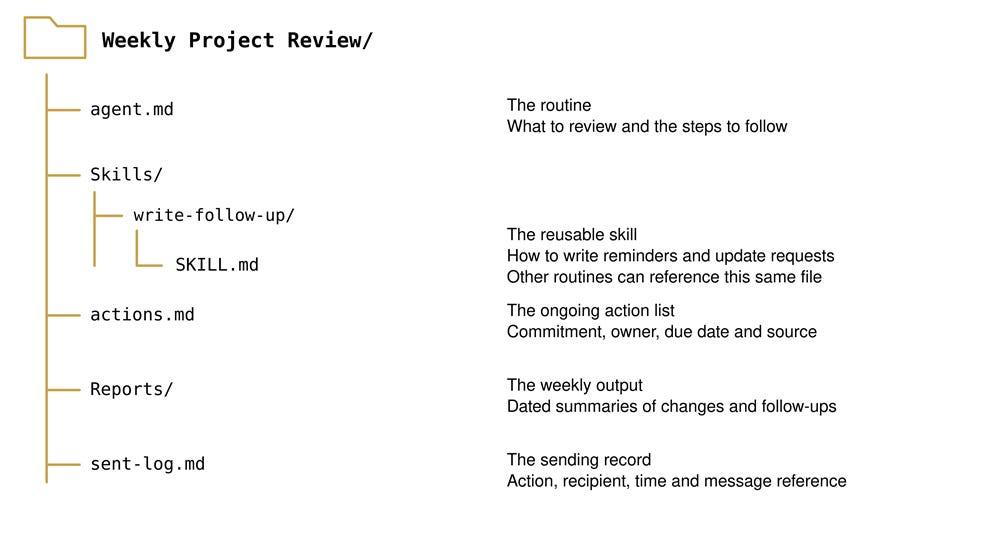
The .md extension means a Markdown text file. Markdown uses simple symbols for structure: # introduces a heading and a hyphen can introduce a list item. You can read the words in an ordinary text editor, and ask AI to revise them. A Markdown file supplies instructions; the AI application follows those instructions using its tools. [4]
On each run, the AI reads the current instructions and working records in the task folder. Each file or folder has a specific role:
Weekly Project Review/is the main task folder. It keeps the routine’s instructions, skills, working records, and outputs together.agent.mddescribes the overall procedure: which emails to review, how to update the action list, when to send follow-ups, and what results to save.Skills/holds reusable instructions for particular parts of the work. Each skill has its own subfolder, such aswrite-follow-up/.Skills/write-follow-up/SKILL.mdexplains how to write reminders and requests for updates, including their tone, length, and required information. Other routines can reference this same skill.actions.mdmaintains the ongoing action list, including each commitment, its owner, due date, and source email. It carries relevant commitments forward into the next weekly review.Reports/stores dated weekly summaries so you can review what changed, which follow-ups were sent, and which items still need attention.sent-log.mdrecords confirmed email sends, including the related action, recipient, sending time, and message reference. The routine checks this record to help prevent duplicate follow-ups.
Separate the procedure from the writing skill
Put the overall process in agent.md.
It identifies what to review, which records to update, which skill to use, and what to save. A short version could read:
# Weekly project email review

1. Read actions.md and sent-log.md.

2. Review the past seven days of project [Placeholders] emails.

3. Update recorded commitments, owners and dates from source threads.

4. Read Skills/write-follow-up/SKILL.md and use it to write reminders and requests for missing updates.

5. Send authorized follow-ups to confirmed owners. Check the log and sent mail to avoid duplicates. Record confirmed sends with their message references.

6. Save the updated records and a dated summary in Reports/. Include any step that could not be completed.
Here, agent.md is the filename we explicitly tell the scheduled AI to read.
The process can read a spreadsheet instead of last week emails. That can also be updated as well.
Filename conventions vary. Codex, for example, automatically discovers AGENTS.md under its documented rules. In another application, naming a file agent.md may give it no special behavior until you reference it. [5]
Put the email-writing method in Skills/write-follow-up/SKILL.md. A skill is a reusable set of instructions, sometimes accompanied by references, templates or scripts. Compatible tools use its name and description to help identify it. For this example, the instructions can stay short: [6]
---

name: write-follow-up

description: Write concise project reminders and update requests.

---

# Write a follow-up

- Address the confirmed action owner.

- Identify the commitment and its recorded due date.

- Ask for a status update or the specific missing information.

- Use a professional tone and no more than 120 words.

- Keep to the recorded commitment and deadline.

- Preserve the source thread when appropriate.
This separation gives you two ways to improve the routine. Edit agent.md to change the review process. Edit SKILL.md to change how follow-ups are written.
This algorithmic division of processes and skills is the mindset shift you need to expand this process to much more complex tasks.
Another routine, such as procurement follow-ups, can reference that same skill file by its accessible path. Sharing the file lets an improvement serve both routines; separate copies need separate updates.
Keep a record of what happened
Suppose a source email records an owner promising a revised lookahead plan by Tuesday. The weekly review finds no update and uses the writing skill to request one. After the email tool confirms sending, the routine records the action identifier, recipient, time and message reference. It marks the follow-up as sent and retains the project action in the ongoing list.
That record matters when a run is repeated. The routine can check its log and sent mail before sending another reminder for the same action and review period. The weekly summary should say what changed, which emails were sent, and which items still need attention. If sending or saving fails, it should report the unfinished step.
Test once and then schedule
Run the routine manually before scheduling it. Review the chosen source emails and proposed messages, test saving and reading back a report, and use yourself as a test recipient. Check that a confirmed send appears in the record. OpenAI’s scheduling guidance similarly recommends testing the prompt manually and reviewing the first scheduled results. [1]
Then create the weekly schedule with a short instruction pointing to the procedure:
Every [weekday] at [time and time zone], open [cloud folder]/agent.md,
read its current instructions and the skills it references, and carry out the weekly review.
Use the saved action list and sending record.
Save the summary and report any step that could not be completed.
The schedule now identifies when to start and where to find the method. To adjust reminder wording next month, update the shared writing skill. To change which project emails are reviewed, update agent.md. The next run must retrieve those current files for the changes to take effect.
Explain It to a Friend
What if you replaced the AI model next month, say from Gemini to GPT, but kept every procedure, skill and record? The new system might need different connections, yet it would inherit a description of what you wanted done and how you judged a useful result.
This suggests that part of a team’s capability lives outside any individual operator. It lives in the methods people leave behind. The files do not contain all the judgment needed to act well, but they make some of that judgment available to someone, or something, new. How would you explain this to a friend?
Notes
Join the EPM Network to access insights, influence our research, and connect with a community shaping the industry’s future. Subscribe to EPM Research and learn how to receive future PM Along AI posts.
Support us by sharing this article with your friends and colleagues, or over social media.
References
[1] OpenAI. (n.d.). Scheduled tasks.
[2] Anthropic. (n.d.). Schedule recurring tasks in Claude Cowork.
[3] Anthropic. (n.d.). Use Google Workspace connectors.
[4] CommonMark. (n.d.). Markdown reference.
[5] OpenAI. (n.d.). Custom instructions with AGENTS.md.
[6] OpenAI. (n.d.). Skills.